Preserve a building before its appearance changes
- Choose the existing town building whose appearance you want to retain. Selecting a station or a vehicle opens a different window.
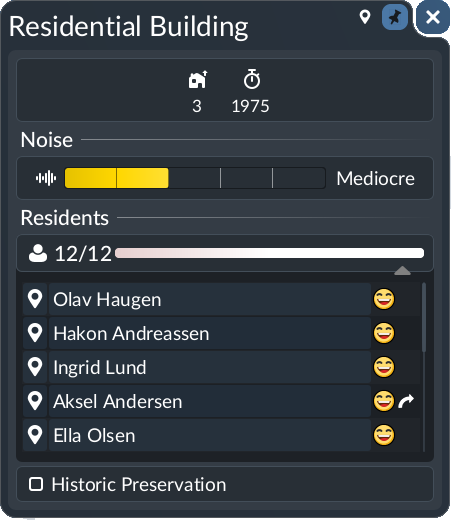
- In the building details, locate Historic Preservation and tick it. The manual's residential example places it beneath the resident list.
- Close and reopen the same building to check that the setting remains selected. Apply it individually to other buildings in your old-town area.
What success means
The preservation setting is enabled on the intended building, and its current visual appearance is the one being preserved. Record a before view if you want to compare it as the town develops. A growing town population does not by itself mean preservation failed.
Preservation is not a whole-town growth switch
The manual confirms retention of a building's visual appearance. It does not establish that this checkbox freezes town level, population, jobs or cargo demand. We have not verified a built-in area-paint tool for marking many buildings at once, demolition immunity or a tourism bonus.
If you cannot get the result you want
If the box is missing, check that you selected a town building and compare your window with the manual image. Record the game build and any building or interface mods before seeking support. If the building has already changed, preservation of its current appearance is not a verified way to restore an earlier model.
For an entire town that should grow differently, start with the actual town controls in the city-growth guide and your game mode. Do not bulldoze buildings or disable growth merely to test this checkbox.
The Glass Train — Donut's Transport Fever
Related gameplay. A viewer asks about marking an old-town area in bulk; the video is not presented as a verified preservation tutorial.
Watch on YouTube ↗