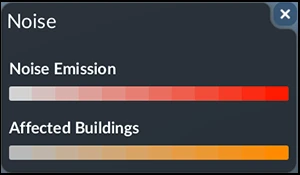
Read Noise and Pollution as different layers
Open the town window to identify the weakest Authority component and show the town boundary. On mouse and keyboard, open the data-layer menu at the top left and choose Noise: deeper red marks stronger noise, while affected buildings are orange. Click a residential building to read its noise level. Compare the hotspot with the route you intend to change.
Switch to Pollution to inspect brown emission and green absorption across the town area. Moving a terminal away from housing may help Noise while leaving it inside the same pollution boundary. After one change, compare that layer, the targeted rating and continued passenger or cargo service. No fixed refresh interval is established.
Compare the same home before and after one change
Select a residential building beside the noisy route and record its displayed noise, the Noise layer and the town's Noise rating. Change one route or vehicle choice, keep transport running, then inspect the same building and camera view again. This is a comparison procedure, not a test we have performed; no reduction percentage or waiting interval is promised.
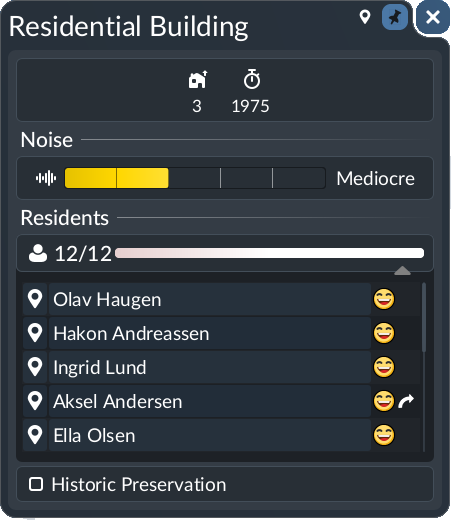
If the home's noise improves but Authority does not, reopen the town breakdown: another component may now be the lowest. If Pollution stays poor, inspect its brown emission and green absorption layer across the municipal boundary. A quieter house is not proof that total pollution fell.
What to do
- Identify the low rating. Open the city information and compare Noise with Pollution. Town Authority is limited by the lowest of its six component ratings; improve the weakest component first. Use the relevant layers to locate affected housing and the sources in the surrounding municipality.
- For noise, inspect the busy residential corridor. The current data-layer manual recommends routing around residential areas and using modern low-emission vehicles with a high maintenance level. Compare the actual vehicle attributes and maintenance coverage before replacing anything. Barrier and tree-lining reduction values remain unverified here. An outskirts hub is a tradeoff: local feeders add waiting, travel time and upkeep.
- For pollution, review the whole area. Look at industries, vehicles and infrastructure across the municipality. Use the network efficiently rather than building excess terminals or duplicating lightly used services. Check whether maintenance coverage is missing before replacing the fleet.
- Use the available mitigation tool for that source. Earlier publisher previews list barriers, underground railways, greenification and pollution plants. Choose the tools actually available in your world and inspect their effect; this page does not claim a universal reduction percentage or unlock level.
- Recheck transport as well as the environment. After one change, compare the relevant rating and whether passengers or cargo still arrive. A quieter route that causes long waits can reduce Satisfaction; a slower freight detour can lower Delivery. Use the city-growth checklist to keep both outcomes visible.
Official pre-release overview. Use the written checks for this task; older videos may describe plans that later changed.
How to tell it worked
The targeted rating or hotspot improves while useful passenger trips and required-goods deliveries continue. Keep the comparison focused on the change you made. Numerical weights, update intervals and barrier absorption values remain unverified in the release build.
If you are still stuck
- Moving the station did not fix Pollution: Check whether it remains inside the same municipal area and whether the emitting vehicles or industries remain unchanged.
- Noise falls but Satisfaction worsens: Inspect the additional wait and journey time created by the feeder route; compare quieter or faster local vehicles.
- The fleet grows dirtier or slower: Check facility range and capacity in the maintenance guide.
- The scores are acceptable but growth still stalls: Check completed deliveries and the other ratings before another environmental rebuild.
Related task checks: vehicle selection · the separate Reputation rating.