Find the first missing passenger connection
Town homes → passenger road stop → road service → harbor-side stop → walkable harbor entrance → passenger boat → fishing grounds → Booster.
This is a route schematic, not a screenshot or a measured walking radius. Check passengers at each handoff: reaching the bus stop does not prove they can enter the harbor; reaching the harbor does not prove they board; docking does not prove the industry counted workers.
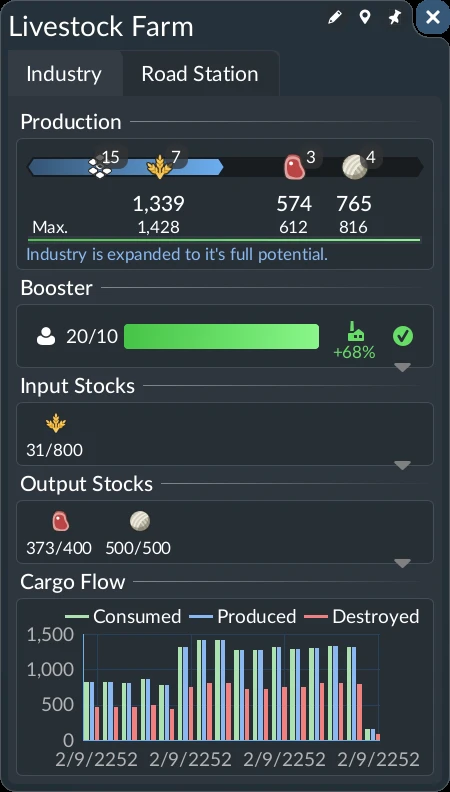
After arrivals, expand Booster and compare its worker list over further trips. The manual requires repeated visits. A universal passenger count, fill time or fishing-ground bonus has not been verified; use the actual panel and any named contract condition, not the farm screenshot's numbers.
Build and verify the complete passenger trip
- Start in a town near the fishing grounds. Put a passenger road stop near the residential area and run a passenger road line to the port. This is the first leg shown in Biffa's route setup around 27:10.
- Connect the port to the fishing grounds. Make a separate passenger boat line from the port to the fishing grounds stop. Check the road connection between the passenger road stop and harbor before adding buses. In a release-player repair, relocating the wrongly placed harbor-side stop made people travel to the port. Keep the passenger leg distinct from the cargo fish route.
- Assign vehicles to both lines. Use a passenger road vehicle on the town leg and a passenger boat on the water leg, then let both services run. A line drawn on the map without vehicles will not carry workers.
- Check the fishing grounds panel. Open its worker booster after passengers have had time to travel. Biffa's preview shows the booster green and task completion feedback by 35:09.
Fishing-ground worker completion
35:09: preview completion feedback. Route setup begins around 27:10; this footage does not establish release-build worker thresholds.
Watch on YouTube ↗Creator preview, build number unknown. The cover is an official manual illustration, not a frame from this video. Use the release-player and manual checks above for current diagnosis.
Verify workers in the industry, not just boat arrivals
Open the fishing grounds’ industry window and expand Booster to see its worker list. The current manual requires workers to arrive frequently: the boost stops when too few have visited recently. Keep the passenger route running and check the list again after further trips. A single arrival is not proof of a sustained boost.
If the list stays empty, follow one passenger from the town stop through the port entrance and onto the boat. Correct the first broken connection, then watch boarding and industry arrival separately. If workers appear but the boost later stops, inspect the return service and frequency before adding capacity.
If this route is a worker subsidy
Read the contract conditions and deadline. The task counts the named industry’s worker boost, not simply a boat arriving. In the October 3 Steam discussion, comment #8 reports that enabling passenger pickup repaired a mixed cargo/passenger line; comment #7 warns to check the road entrance rather than just the highlighted industry.
Release-player worker subsidy and boarding cases. These are specific reports, not proof that every empty route has the same cause.
How to tell it worked
The fishing grounds' Boosters panel turns the worker item green in the preview, and the related task completes. Check that panel and its worker feedback in your own game; a boat merely reaching the dock is not proof that workers were counted. Urban Games confirms that workers from nearby towns can increase industry production.
If the booster stays empty
- No passengers start the trip: inspect the town passenger stop, its connection to the residential area and the road vehicle assigned to the port line. Also check the harbor-side stop's road connection: proximity to the harbor entrance alone did not work in the linked release case. After correcting it, first watch passengers travel toward the port; then verify boat boarding and the worker booster separately.
- Passengers reach the port but not the fishing grounds: inspect the port transfer, the boat line's fishing grounds stop and whether a passenger boat is assigned. A cargo boat will not serve this passenger task.
- Passenger vehicles arrive but the worker item stays unchanged: inspect the final stop's placement beside the fishing grounds and the Boosters panel. In a separate farm preview, moving a stop closer preceded a rise in workers; that example does not establish a universal distance rule.
Return-trip check: a September 30 player saw buses start carrying people after adding a dedicated passenger boat line, and stop again after deleting it. Replies identified the missing passenger return trip. If your boat only accepts Fish on the return leg, test a complete passenger service in a separate save and watch both directions and the worker booster.
Other industries
Urban Games describes worker supply as an industry production booster. Seniac's farm preview also shows a passenger stop adjustment and later worker progress. The fishing grounds and farm are separate preview examples; other industries may need a different route or stops. If workers register but output remains low, follow the industry output check.
Connecting separate passenger stops? Check the walking transfer and green reachability indication before assuming that overlapping circles connect the worker journey.
Workers reach the bus stop but not the port
Trace a continuous passenger walking connection from the bus station to the port entrance. In Tachyon Lance's October 8 example, changing lines did not help; adding the missing road link allowed workers to reach the oil platform. Cargo's radius-only reachability does not establish passenger access.
Watch the missing port-road connection example. This is a separate oil-platform case, not the original fishing-ground preview. If people cannot board at an otherwise reachable stop, use the passenger boarding checks; if they arrive but a farm subsidy still shows zero, inspect that contract and the actual industry booster before calling the journey successful.
A refinery is across the road from the port, but nobody boards?
In a separate coastal-refinery case, ignite-me reported that the origin port already supplied offshore industries. The final walk from the destination port was the missing connection: after kinkyonmain suggested checking crossings, the author confirmed that correcting the road type and adding crosswalks fixed the issue.
- Select the destination passenger port and inspect the route to the refinery's entrance, not just the distance across the road. Look for a continuous walkable street and a usable crossing; cargo catchment does not establish this passenger path.
- If the approach uses an unsuitable country road, replace the affected section with a city street that provides pedestrian access. In Roads → Tools, use the Crosswalk Tool to add pedestrian crossings at the relevant intersection. Recheck the passenger access after the edit.
- Follow the next passenger journey through the port and into the industry. Then inspect the industry's Booster worker list over further arrivals. An access repair does not establish a fixed worker count or guarantee that a separate subsidy will complete.
This source reports a successful road-and-crosswalk repair, not proof that every empty coastal route has the same cause. If access already works but staffing later falls, check recent worker arrivals and service frequency; this case does not establish how all residents choose jobs.