Fish stays aboard: choose the matching symptom
| Symptom | Check and repair | Evidence |
|---|---|---|
| Fish stays aboard; unload warning | Remove Fish from the receiving stop's Load selection; clear an unwanted destination fill target. Recheck one loaded arrival. | Player-confirmed repair; not our playtest. |
| Correct settings, no Fish in storage | Check both stops' cargo catchment, the warehouse Fish filter and free space. Direct consumer delivery can bypass storage. | Manual checks; no single cause proven for every case. |
| Fish in storage, truck empty | Check truck access to that warehouse, Fish pickup at this stop and compatible cargo capacity. | Manual-based diagnosis; not a measured before-and-after test. |
| Truck returns with Fish | Check the town stop's Load selection, building coverage and remaining Fish demand. | Release-player and developer checks; not our playtest. |
These checks cover the fishing-grounds → harbor → town task. The warning can also occur on other cargo routes; it does not establish one universal Fish or warehouse fix.
Read the two panels before rebuilding the route
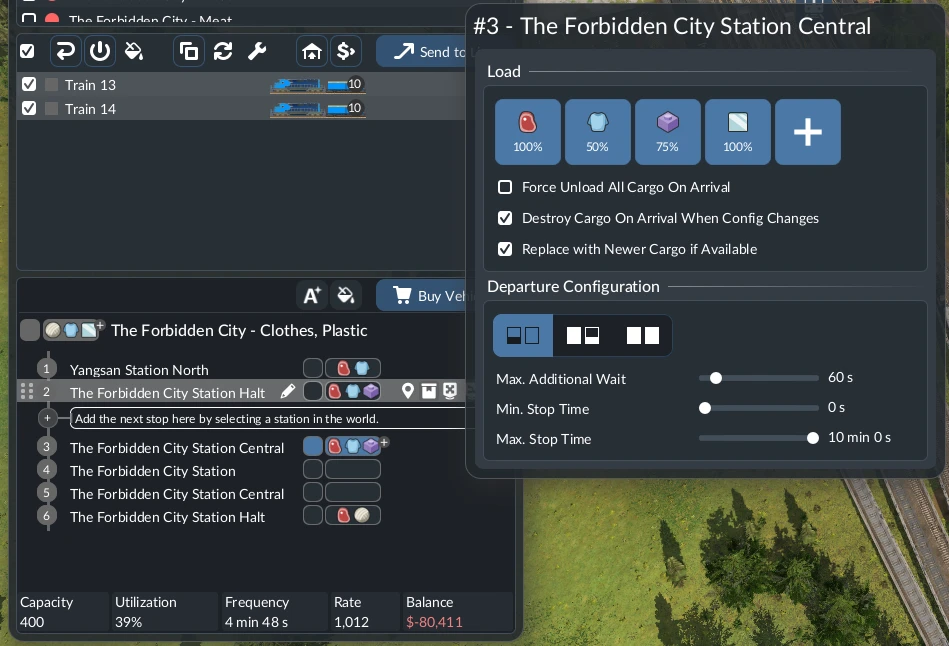
In Line Manager, select the ship line, then open the destination stop’s cargo icons or configuration control in the lower stop list. The cargo icons under Load request pickup at that stop; they are not unloading commands. Automatic unloading still needs a reachable receiver that accepts Fish.
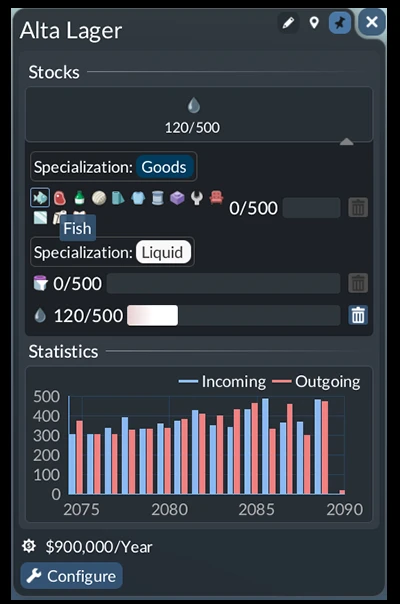
At the handoff warehouse, open Stocks and inspect the receiving module. Select Fish on a suitable Goods module, check its stored amount and free capacity, then verify that both the harbor and truck stop reach that warehouse. A specialized module holds one cargo type at a time; a universal warehouse can hold mixed cargo.
Finally, click a receiving town building and inspect its requested cargo and current supply. A stop inside the commercial district can still miss the buildings that need Fish. Success means Fish reaches that consumer; filling a transfer warehouse only completes the middle of the journey.
Repair the route
- Check the ship line's two stops. Select Fish for loading at the fishing grounds. At the town harbor, remove Fish from the load selection; in a September 29 release-player case, that setting made the ship try to load at the destination. Watch one loaded ship arrive: unloading is automatic when a reachable receiver accepts the cargo. The Fish icon in the load selector is not an unload command. In a release Steam thread, another player traced a blocked town unload to Fish fill level set to 100% at the destination, even with force unload selected; clear that destination loading/fill demand if present.
- Check the harbor and receiving connection. Harbor landings serve both passengers and cargo. Check that the landing fits your ship; large ships need large landings. Select the harbor and then the truck stop: the Fish warehouse must be inside both cargo catchment areas, with a blue or white highlight. Cargo transfer needs catchment coverage, not a passenger walking path. Check that the warehouse accepts Fish and has free capacity.
- Check the warehouse's Fish slot. Open its stock/filter panel. If another product occupies or filters the receiving warehouse, select the Fish filter or provide a separate Fish-compatible module and watch whether Fish enters. A release-player warehouse case was resolved by changing this filter; it does not prove every empty warehouse has the same fault.
- Complete the separate truck leg. Load Fish at the cargo stop accessing that warehouse. Send a compatible truck to a second stop that reaches the requesting town buildings; leave Fish out of the destination stop's load selection. If the receiving town is already in the harbor's coverage, inspect whether it consumes Fish directly before assuming the warehouse should fill.
- Trace one delivery. Watch Fish on the ship, the harbor/warehouse incoming or stock display, Fish on a departing truck and the receiving town's delivery. Use the first missing stage to choose the next check.
Fish loading and warehouse repairs
17:45: loading direction; 24:03: warehouse added. These are separate changes in a preview build, not a controlled release-build test.
Watch on YouTube ↗Creator preview, build number unknown. The cover is an official manual illustration, not a frame from this video. Use the release-player and manual checks above for current diagnosis.
The destination is full?
If the arriving vehicle carries the right cargo and the connection works, inspect the actual receiving stock. A full factory input or transfer warehouse can leave cargo on the vehicle. Follow the full-buffer and oversupply checklist before adding another feeder or enabling forced unloading; discarding excess is not successful delivery.
Why these are separate faults
In Seniac's preview run at 17:45, the ship's load and unload settings were reversed. Fixing that let the ship collect fish. Later, at 24:03, he added a warehouse near the harbor and truck stop to make the onward transfer work. The video shows both changes, so it does not prove that the warehouse alone fixed the entire route.
How to tell it worked
The full chain completes: Fish boards at the fishing grounds, leaves the ship at the harbor, appears in the receiving warehouse or is directly consumed by a connected customer, then travels on the truck and counts at the requesting destination when a truck leg is needed. In the preview, the player changed both stop direction and warehouse placement; that footage cannot isolate one universal fix.
If Fish still does not move
- The ship is empty: recheck Fish loading at the fishing grounds, ship cargo compatibility and whether the route reaches the source.
- Fish stays on the ship at the harbor: remove Fish from the destination's load selector, check the receiving warehouse's Fish filter, free capacity and cargo catchment. A September 29 player reported “A cargo type cannot be unloaded anywhere, despite being loaded at stop1” before correcting this selection.
- The ship unloads, but the warehouse stays empty: inspect the harbor–warehouse connection and warehouse Fish filter/available slot. If nearby consumers accept Fish directly, check their delivery first. Another player's ship unloaded once and stopped despite a warehouse; that report has no confirmed single cause.
- Fish enters storage, but trucks are empty: check the outgoing stop's warehouse access, Fish loading there and the truck's cargo category. Use the general transfer checklist if another line or product is involved.
- A truck carries Fish back from town: remove Fish from the destination's load selector and any 100% Fish fill level, then verify the drop-off stop covers the requesting buildings. If it does, click individual receiving buildings to see whether their Fish demand is already full, as UG-Sam suggests in the release thread. A pickup stop beside a warehouse is not automatically a completed town delivery.
Urban Games' direct-consumer exception means a warehouse is required for a change of line, not every direct delivery. If every visible stage passes but the task still fails, save the warning, stop settings and warehouse stock screen for a release-build bug report; current player threads do not establish a universal bug or exact connection radius.